· Jesse Edwards · Case Studies · 4 min read
Alright, Let’s Go: Security Discussion 1
Security is hard. That’s why most products get it wrong.
Why start with security at all
RenovationRoute was built to solve real problems: unclear scopes, payment disputes, and broken trust between homeowners and contractors.
Security is not easy. I think because it is needed everywhere, it’s not uniformly applied, and it slows development and releases down. Securing a network is not the same as securing an application, which is not the same as securing a CI pipeline. And no matter how much you try, it is added work which means more effort == more time. Add that to the complexity of it and receive mail about security breach, sorry this happened, but get your 12 months of credit monitoring for FREE!
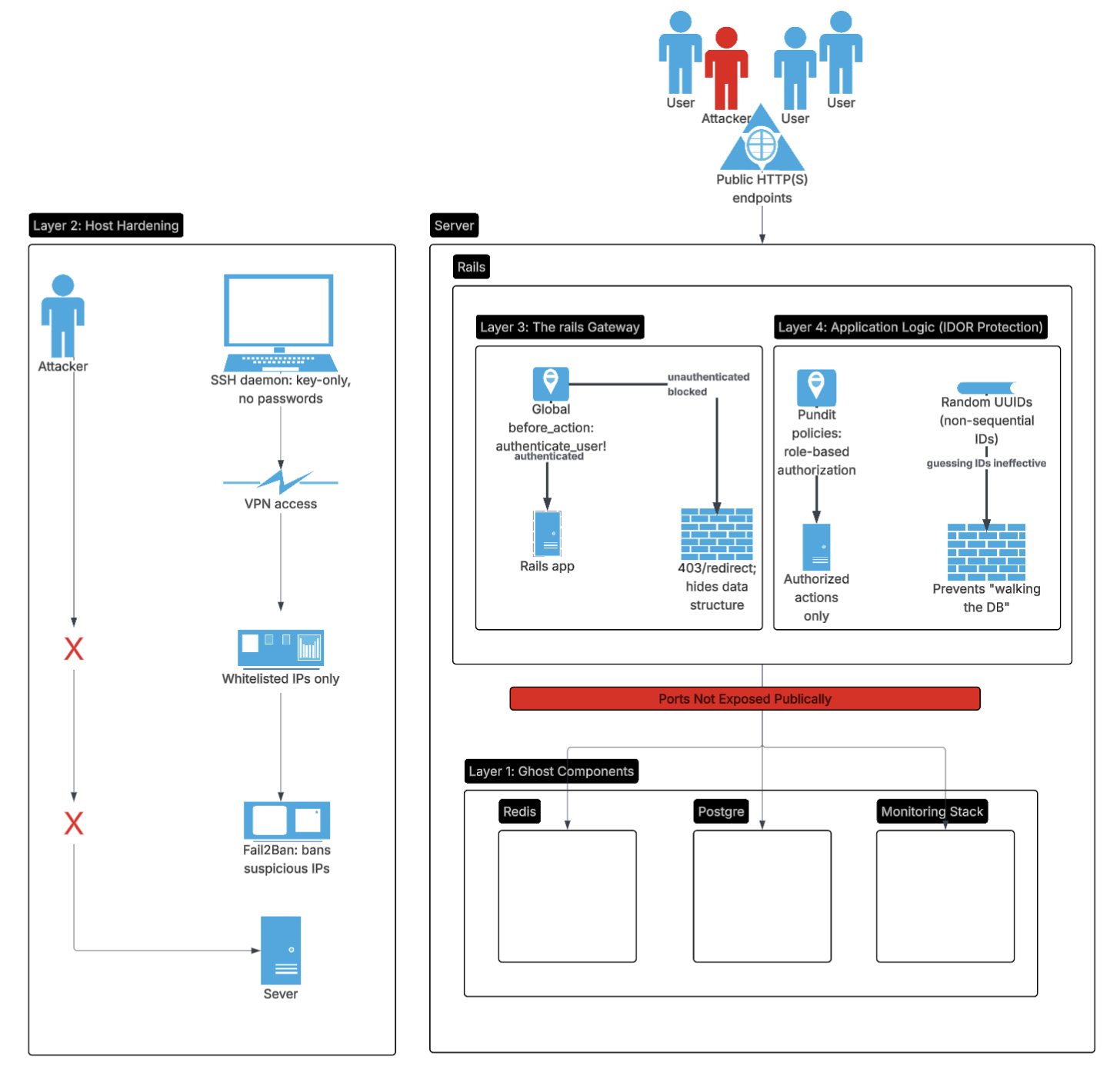
Defense in depth I think is one strong way to approach security. You have to assume that any one layer can be breached, so multiple layers of defense are needed to protect the system as a whole.
This post starts the security series by grounding everything I have learned over the years and is in the actual architecture that runs RenovationRoute today.
Architecture refresher
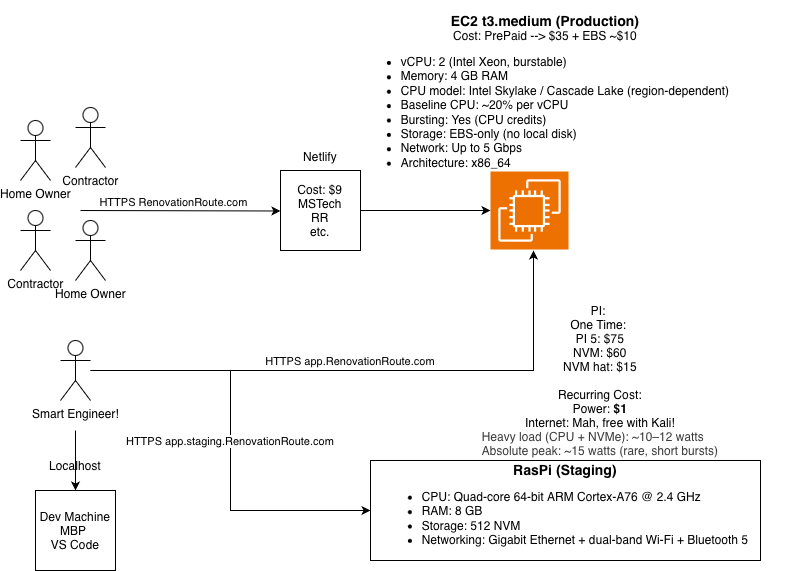
Before talking about threats, let’s refresh on the architecture we have.
Production currently runs on a single EC2 instance hosting:
- Rails application
- Sidekiq workers
- PostgreSQL
- Redis
- Grafana
- Prometheus
- cAdvisor
- OpenTelemetry
Staging mirrors this setup on a Raspberry Pi 5 using the same containers. This is intentional. Again why? Keep things simple and low cost.
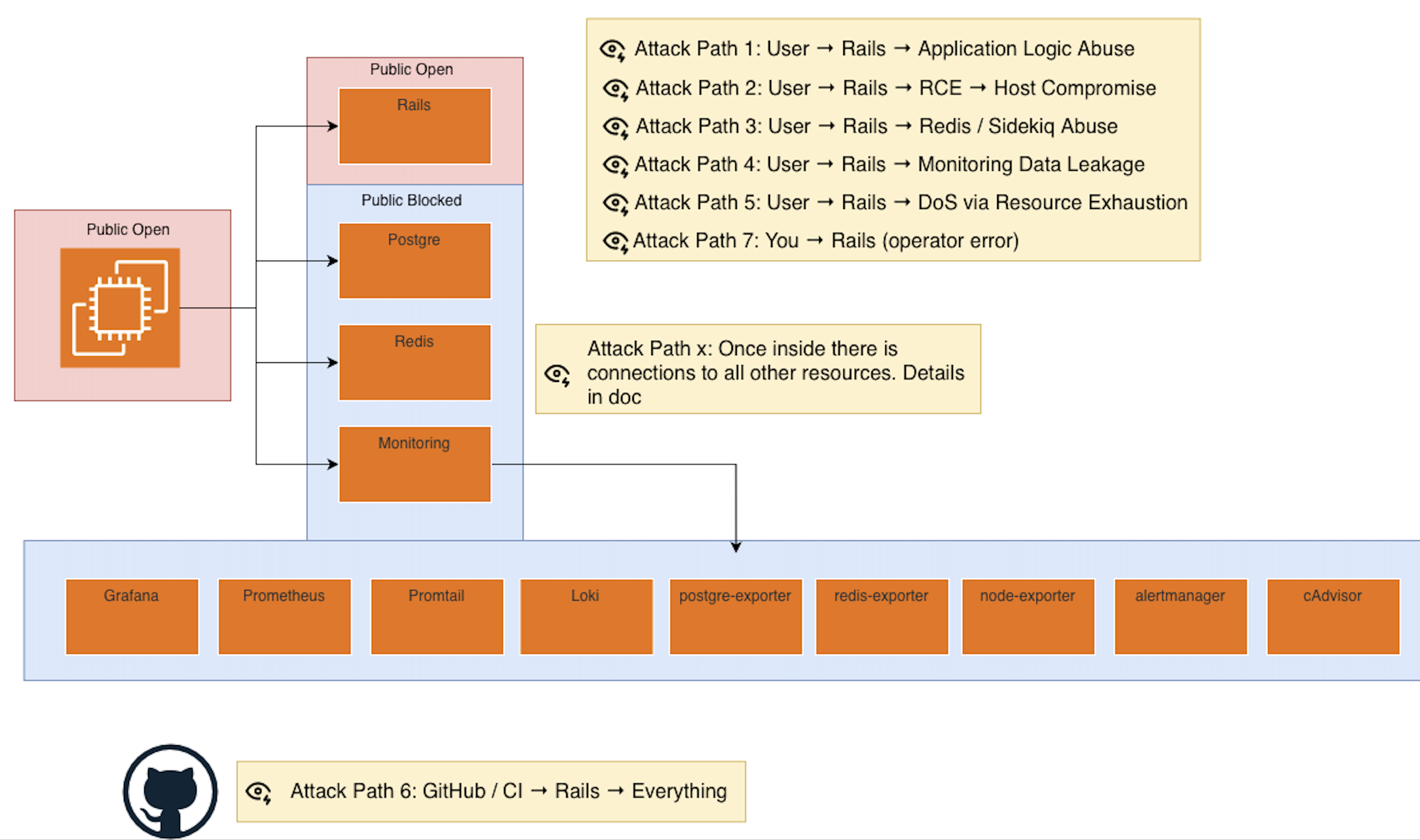
Start with threat modeling, we did this last post go check it out
After the threat modeling it helps paint a more clear picture about what is critical to what is moderate risk.
Public exposure and open ports
Let’s be explicit about what is open.
EC2 (production)
Open to the public:
- Port 80 (HTTP)
- Port 443 (HTTPS)
Restricted access:
- Port 22 (SSH)
Only accessible from a single IP address tied to my VPN.
Raspberry Pi (staging)
Same model:
- Ports 80 and 443 open
- Port 22 restricted to a single VPN IP
No other ports are reachable. No admin dashboards. No metrics endpoints. No databases exposed.
Reducing the exposed surface area is one of the highest return security moves you can make.
SSH and host access controls
SSH is one of the most common attack paths, so it gets locked down aggressively.
- No root login
- No password authentication
- Key based access only
- Fail2ban enabled to eliminate brute force attempts
- SSH access limited to a single known IP
Even if someone finds the host, they still need:
- The correct key
- From the correct IP
- Without triggering bans
Defense in depth, not trust.
A quick but important detour: key rotation
This deserves its own callout.
Being able to rotate keys quickly matters more than most people think.
I have seen:
- Keys accidentally committed to repositories
- Keys printed in logs
- Long lived credentials reused across environments
- Enterprise systems compromised because rotation was painful
If rotating a key feels scary, your system is already insecure.
This applies to:
- AWS credentials
- Webhook signing secrets
- Third party API keys
- CI secrets
Assume compromise happens. Design for fast recovery.
GitHub as an attack surface
GitHub is both a front door and a potential backdoor.
Front door risks:
- Account takeover
- Password reset paths
- Email compromise
Back door risks:
- Malicious commits
- Compromised CI workflows
- Stolen secrets from pipelines
Controls in place:
- Two factor authentication enforced
- Minimal access permissions
- Secrets scoped tightly to what CI actually needs
GitHub has a large attack surface by nature. The goal is to limit blast radius, not pretend it is safe by default.
Identity, access, and roles
Right now this is a single operator system. That simplifies things.
If and when a team exists, access will be structured using cloud roles instead of shared credentials.
Principles that apply immediately:
- Never use root accounts
- Use least privilege everywhere
- Separate human access from machine access
- Require multiple approvals for sensitive actions
- Prefer short lived credentials over long lived keys
If something requires trust, it probably needs another layer.
Keys and secrets inventory
Some of the active secret categories today:
- AWS (SES, S3)
- Stripe (webhook signing secrets)
- Google APIs
Rules I follow strictly:
- No secrets in code
- No secrets in logs
- No secrets in images
- Rotate aggressively
- Scope permissions narrowly
- When possible, hardware backed keys or managed key services are preferred
What this post is and what it is not
This is not an exhaustive security guide.
This is the foundation.
Future posts will go deeper into:
- Network isolation
- Application level security
- Dependency risk
- CI and supply chain security
- Observability and detection
- Incident response and recovery
Security is a system. You build it one layer at a time.
Final note
Security is not about being paranoid. It is about being honest about how systems actually fail.
The goal is not perfection.
The goal is survivability.