· Jesse Edwards · Case Studies · 3 min read
How to Lock Down a Web App (Actual Steps, No Fluff)
Mitigations for secrets handling, OAuth bypasses, dependency typosquatting, prompt injection, and more.
How to Lock Down a Web App (Actual Steps, No Fluff)
Mitigations for secrets handling, OAuth bypasses, dependency typosquatting, prompt injection, etc.
This assumes:
- You have an app
- It’s running
- You are responsible for not getting burned
Phase 0: Stop Guessing
Step 0.1 — Write down what exists
Before touching anything:
- What processes run
- What talks to the internet
- What stores data
- What deploys code
- Who can log in as admin or operator
If you can’t answer those in one page, you are not securing anything yet.
Phase 1: Reduce the Attack Surface First
This is the fastest risk reduction.
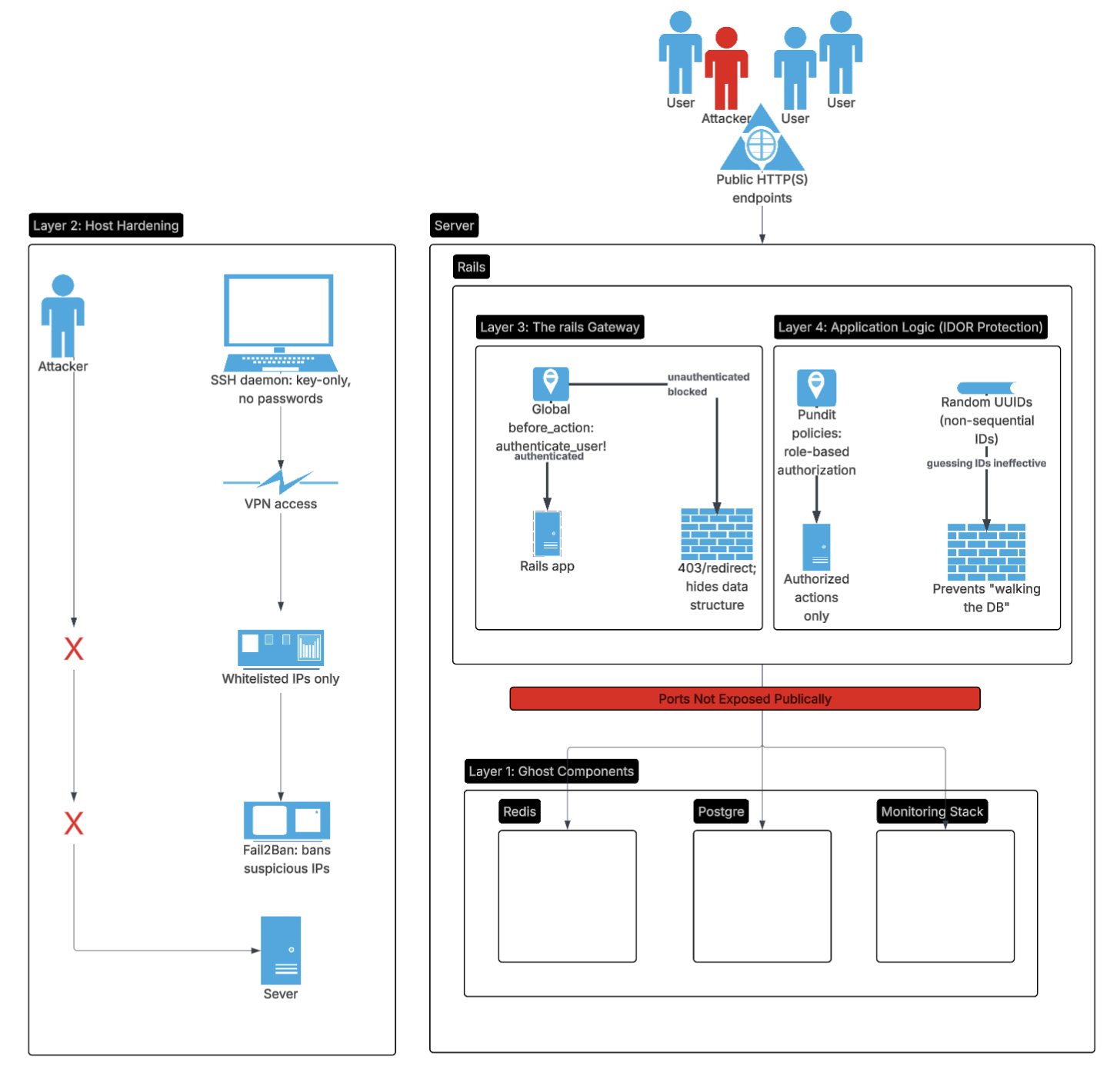
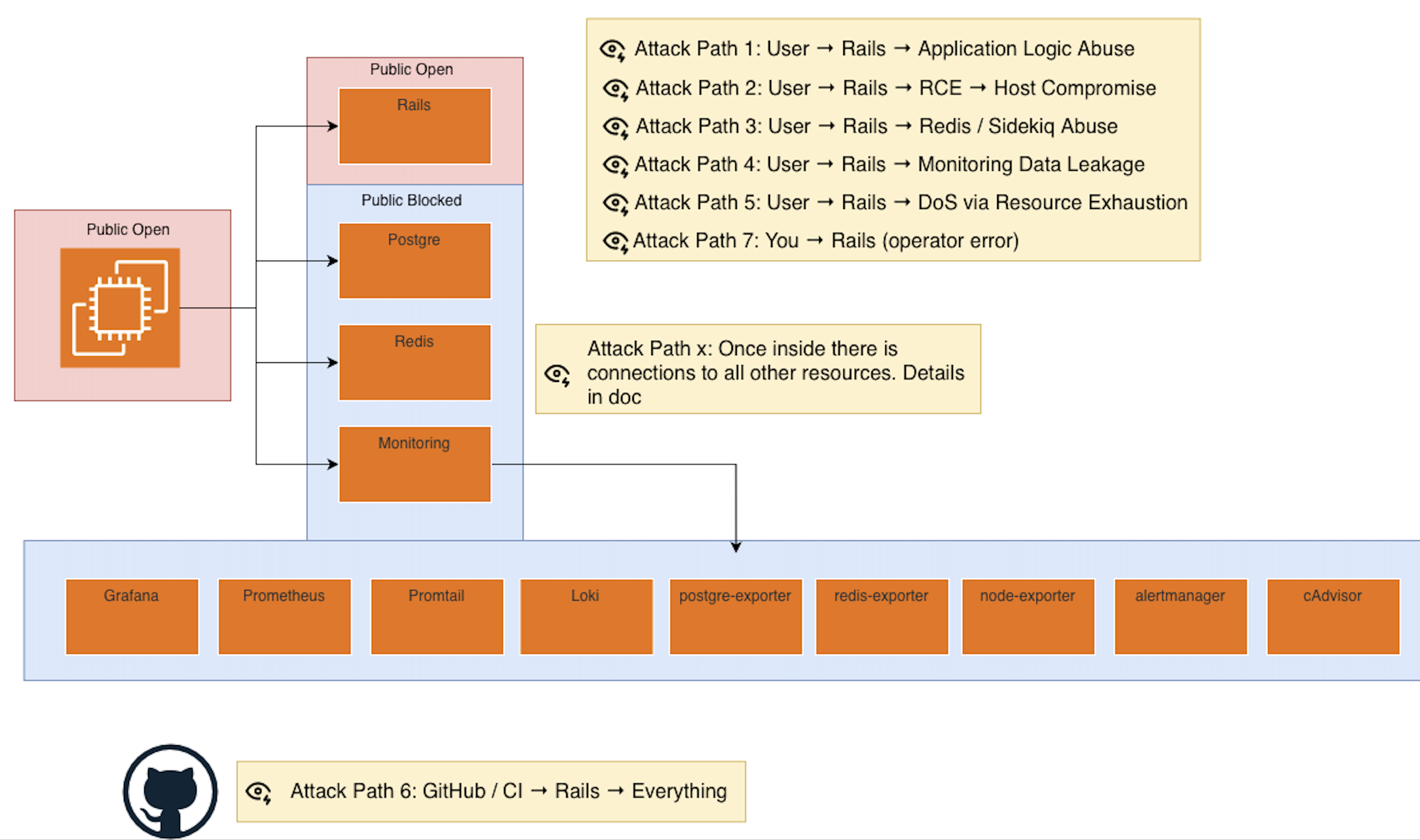
Step 1.1 — Close everything by default
- Only required ports open
- Only required protocols
- Only required IP ranges
Rule:
If it does not need to be reachable, it should not be reachable.
Step 1.2 — Enforce TLS everywhere
- HTTPS only
- No plaintext internal shortcuts
- No “temporary” HTTP
Step 1.3 — Remove accidental exposure
- Admin panels
- Debug endpoints
- Metrics dashboards
- Health checks with data
Most real incidents start here.
Phase 2: Lock Identity and Access
This is Tier 0.
Step 2.1 — Authentication correctness
- Strong auth
- MFA where possible
- No shared accounts
- Secure session handling
If auth is broken, nothing else matters.
Step 2.2 — Authorization correctness
- Object-level checks
- Ownership validation
- Role boundaries
- State-based permissions
This is where most breaches live.
Ask:
Can a valid user access something they should not?
Phase 3: Protect the Application Logic
This is where security actually happens.
Step 3.1 — Input validation
- Enforce schemas
- Enforce types
- Enforce sizes
- Reject unexpected input
Step 3.2 — State machine discipline
- Explicit transitions
- No implicit state changes
- No “just update the record”
Money, status, and lifecycle bugs are security bugs.
Step 3.3 — Idempotency and replay safety
- Payments
- Jobs
- Webhooks
- External callbacks
If something can be replayed, it will be.
Phase 4: Contain Damage (Blast Radius)
Assume compromise.
Step 4.1 — Least privilege everywhere
- App only has the permissions it needs
- Jobs only do what they must
- Admin access is separated
Step 4.2 — Process isolation where possible
- Web vs workers
- App vs database
- Control plane vs runtime
You don’t need perfect isolation.
You need intentional isolation.
Phase 5: Lock the Control Plane
Most people forget this.
Step 5.1 — CI/CD security
- Who can deploy
- Who can change workflows
- Where secrets live
- Audit logs enabled
If CI is compromised, runtime defenses are irrelevant.
Step 5.2 — Dependency discipline
- Pin dependencies
- Know what you’re running
- Track updates intentionally
This is where SBOMs live:
inventory first, automation later.
Phase 6: Host and Infrastructure Hardening
Now go lower.
Step 6.1 — OS hardening
- Patch cadence
- SSH locked down
- No root access
- Key-based auth only
Step 6.2 — Resource limits
- CPU
- Memory
- Disk
- File descriptors
This is DoS protection.
Phase 7: Logging, Monitoring, and Evidence
Security without evidence is theater.
Step 7.1 — Log the right things
- Auth events
- Permission failures
- Payment actions
- Job execution
Step 7.2 — Don’t log secrets
- Tokens
- PII
- Headers blindly
Logs are an attack surface.
Phase 8: Incident Readiness
Assume failure.
Step 8.1 — Can you rotate keys fast?
- App secrets
- API keys
- Database credentials
Step 8.2 — Can you redeploy fast?
- Known good build
- Rollback path
- No manual heroics
Step 8.3 — Can you answer “what happened?”
- Logs
- Metrics
- Traces
- Deploy history
If not, you are flying blind.
Phase 9: Human Layer
This is unavoidable.
Step 9.1 — Limit human access
- Who can SSH
- Who can deploy
- Who can read prod data
Step 9.2 — Assume mistakes
- Guardrails
- Confirmations
- Separation of duties where possible
Most incidents involve a human somewhere.
The Mental Model to Keep
If you remember nothing else:
- Reduce what’s exposed
- Make identity and authorization correct
- Constrain what code is allowed to do
- Assume compromise and limit blast radius
- Secure the control plane
- Be able to recover fast
Everything else is tooling detail.