· Jesse Edwards · Case Studies · 9 min read
When AI Is Wrong in Production, and How We Catch It
Clean data in did not mean clean answers out. The checks that still catch 4 to 9% of AI output, the other ways to verify it, five things AI did in production that I did not see coming, and a cheat sheet for where AI belongs.

This is the second post in a series. The first one, A Year of Building With AI: What Worked and What Didn’t, is about building with AI. This one is about what happens when you put AI inside a product that real people and real money depend on: where we use it, what went wrong for us, how we catch it, and the cheat sheet I ended up with for where AI belongs.
Where AI lives in RenovationRoute
Before getting into what went wrong, here is where we use it. AI shows up in two main places in the product.
The first is the Rails app, the part homeowners and contractors use. There it helps them work more efficiently and gives them the knowledge to make their projects more successful. Its main problem was hallucinating about pricing and construction codes. Feeding it the relevant data as text, forcing strict JSON output, and checking that JSON with a few guardrails cut most of that down. It was not too complex, so I will not go deeper here.
The second is the data processing side. This is the grunt work, where most of the building happens, and where I really started to push AI. Here is what it does:
- Retrieves government jobs
- Runs deep analytics
- Finds contractors
- Matches contractors to jobs
- Builds bid package checklists and bid packages
- Writes newsletters
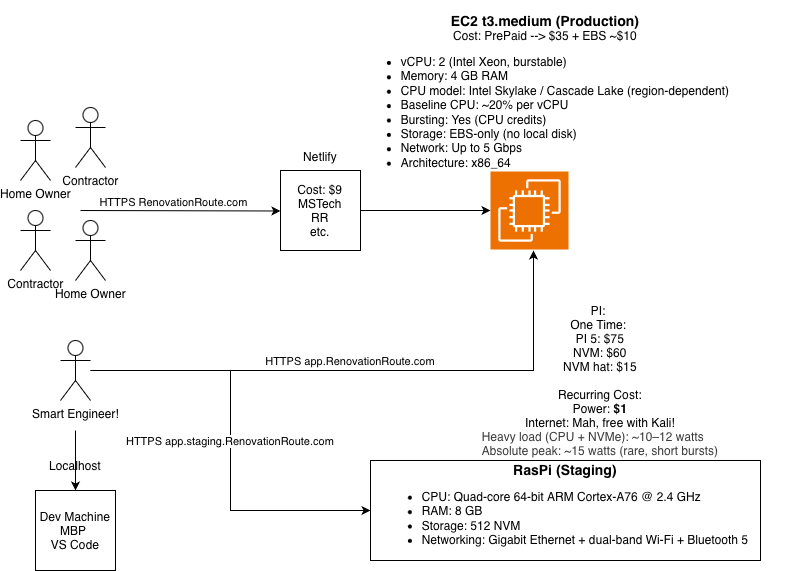
It started on a Raspberry Pi with 8GB of memory, and I outgrew it fast. Even with swap, it thrashed as soon as I ran more than one process at a time.
Across both sides, this is what the AI work actually runs on:
| Technique | How we use it |
|---|---|
| LLMs and mini models | Across the Rails app and the data pipeline, with every call from the last 30 days in our ledger |
| Vision | Homeowner photos go to gpt-5.1 during estimate conversations |
| Image generation | gpt-image-1 generates design photos |
| Embeddings with pgvector | 1,536-dimension vectors stored in Postgres, still being generated today |
| HNSW and IVFFlat indexes | Both are in the database for fast vector search |
| Local Hugging Face models | Two models run on our own server and load on every bid checklist build |
| Semantic search | Cosine similarity queries when enriching jobs in real time |
| Reranking | Finding comparable past awards, 520 rerank calls in the last 30 days |
| RAG-style anchoring | Bid estimates only run when there is real award data to anchor on |
| Two-pass self-consistency | Checklists run twice, the passes are merged, and anything they disagree on is marked disputed |
| Grounding | Every checklist row carries the grounding data that ties it back to the source |
| LLM-as-judge | A model checks each drip email before it sends, 634 calls in the last 30 days |
| OCR | Tesseract reads scanned document pages |
| Cost tracking, token budgets, tiering | Every call is logged with its cost, token use is budgeted, and work is tiered across models |
| Benchmarking | Models are tested on our own data before we switch |
| MCP server | Our own MCP server runs as a service |
It made up numbers
I try to be as efficient as possible. Whenever I can automate something, I do. I reached for AI for the reason that I think most people do: it is supposed to make doing work more efficient.
So I pointed it at the job postings and had it write the summaries contractors actually read. It made up numbers. Deadlines that were not in the document, dollar figures close enough to look right. I first blamed the model, then very quickly realized the data itself was a mess.
In all fairness, I did not fully understand how messy the data was. RenovationRoute pulls jobs from several different sources, and a single job does not even agree with itself. The API says one thing, the web page shows another, and the written description, the structured fields, and the attached specs can each say something different again. One job could have four conflicting answers for every piece of data that matters, and we have to surface the right one. Normalizing that turned out to be a massive task, and most of the time AI is garbage at it. So we fixed the data ourselves before any of it reached the model. I figured that with clean data going in, clean answers would come out.
Wrong. Dead wrong.
Even with the data fixed, AI-written dates and dollar amounts did not always match the source. So now every date and dollar figure the AI writes gets checked against the original document before anything goes out. Those checks still catch 4 to 9% of the output. That number has never gone to zero.
How the check works, because “we verify it” means nothing without the how:
- The model has to return the value and the exact sentence it came from.
- Code confirms that sentence really exists in the source document.
- Code confirms the value is actually in that sentence.
- Anything that fails is dropped or held for a person, never published.
There are other ways to do this, and they are not equally strong:
- Quote and verify (what we do). Strong, because the model cannot pass the check with something that is not in the source.
- Let code find the candidates, let AI only choose. Code pulls every date or dollar amount out of the document, and the model only picks which one is the site visit date. It cannot invent a value that is not on the list.
- Compare sources. Check the answer against a structured field from another source, and flag any disagreement for a person.
- Strict output format. Force the answer into a schema (a date is a date, an amount is a number). We do this too, but it only catches malformed answers, not wrong ones.
- Have a second model check it. Cheap and easy, and it catches some mistakes. But it can be wrong the same way the first one was, so it should never be the only check.
- A person reviews what gets flagged. The final backstop for anything that matters.
It sounded sure when it was not
Our AI matching would pair a contractor with a bid they could not actually win: a sole-source award, or a set-aside they did not qualify for. Now plain code removes those before any match is made, and a final check reads each email before it goes out and holds anything that looks wrong for a person to review. Sending is off by default and has to be turned on explicitly.
That final check is itself AI, and if it errors, the email goes out anyway. I chose that. The plain code already threw out the jobs a contractor cannot win, and I would rather not have one API hiccup stop all outreach for the day. It is a trade-off, and I would rather tell you about it than pretend there is none.
Some things it did that I did not see coming
It copied our own example into real jobs. The prompt that reads a solicitation includes a sample wage determination, to show the model the format. The model started putting that sample into jobs that never mentioned it. So now code checks for any value that appears in our prompt but not in the solicitation, and deletes it. That check has removed 55 values so far.
It made up its evidence. We make the model quote the sentence that proves each answer, and then code looks for that quote in the document. 857 times the quote was not in the document. So asking for a source is not enough. You have to check the source it gives you.
It filled in what the document did not say. One notice said the site visit was “August 4th”, with no year. The model returned “2026-08-04” as if the notice had said it. Now we only publish a year when the sentence it came from actually states one.
The checker can be wrong too. Our date check once flagged 39.8% of site visit dates as unsupported. The dates were fine. We had thrown away the attachment that contained them. A check is only as good as the source you keep, so now we keep every attachment.
The cheaper model was not the same model. gpt-4o-mini wrote the same explanations as gpt-4o, sometimes word for word, but it scored matches about 10 points lower. If we had not tested it on our own data, we would have silently dropped good matches. We lowered the cutoff from 70 to 60 to make up for it.
Some jobs do not need AI at all
Some parts of RenovationRoute use no AI. The plain rules version is faster, cheaper, and correct every time. Knowing when to say no to AI is part of the work.
Where AI belongs
The pattern that works for us:
- Let AI draft and extract. Turning messy input into structure, first drafts, summaries, pulling fields out of documents.
- Let code check and decide. Anything with a right answer goes through deterministic code: validation against a strict format, checks against the source, business rules.
- Keep a person on anything that matters. Money, customer-facing messages, anything you cannot take back.
- Treat model output like untrusted user input. Because that is what it is. Delimit it, validate it, and never let it act on its own authority.
The cheat sheet
| Task | AI? | What to do instead, or what to add |
|---|---|---|
| Normalizing data (dates, money, conflicting sources) | No | Rules in code, a fixed order of which source wins, flag conflicts |
| Math, dollar amounts, date calculations | No | Code does the math; AI can only point to where the numbers are |
| Eligibility and business rules | No | Plain code, so the answer is the same every time |
| Checking its own work | No | Check against the source document with code |
| Anything you cannot take back (money, sending, deleting) | No | A person approves it |
| Pulling one fact out of a long description or spec | Yes, with checks | Make it quote the line, then confirm the quote is really there |
| Sorting into a fixed set of labels | Yes, with checks | Reject any label outside the set |
| Matching and scoring | Yes, with checks | Test on your own data and set the cutoff from the results |
| Asking questions and getting answers | Yes | Great for learning and exploring; confirm facts before you rely on them |
| Explaining unfamiliar code or a document | Yes | Fast way in; spot-check what it tells you |
| Reviewing code you wrote | Yes | A second set of eyes; you still decide |
| Summarizing long documents for a person | Yes | Keep the original one click away |
| Writing code | Yes | Review it based on what is at stake |
| Writing its own tests for its own code | Careful | Write or review the tests yourself |
| First drafts, rough notes into clean writing, working through ideas | Yes | Read it before it goes anywhere |